Flow Health Check
Overview
Flow Health Check analyses the currently open Salesforce Flow and produces a structured health report intended to help identify maintainability, reliability, performance, and portability concerns.
The feature inspects the current Flow metadata, evaluates it against a defined set of health rules, groups findings into issue families, calculates an overall score, and presents the results in a dedicated modal. It also provides export options for summary sharing and follow-on improvement work.
What the feature does
Flow Health Check currently performs the following high-level steps:
- Determines the current Flow from the Salesforce URL.
- Retrieves the Flow metadata.
- Normalizes the Flow metadata into a stable internal structure.
- Evaluates the Flow against a set of health rules.
- Groups findings into issue families.
- Calculates an overall score and rating.
- Builds supporting summary data, including dependency information.
- Displays the report in a modal with export and copy actions.
Where it appears
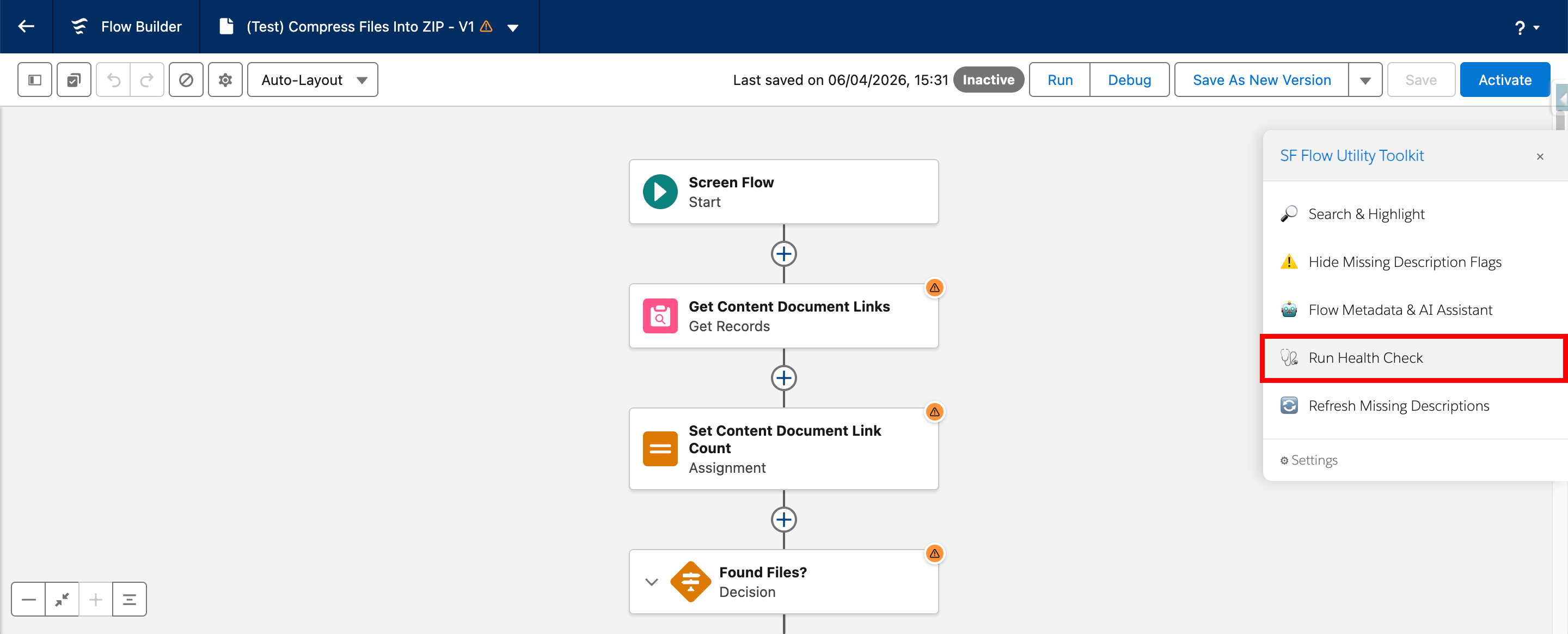
Flow Health Check runs against the currently open Flow in Salesforce Flow Builder.
The report is presented in a modal overlay titled Flow Health Check.
Report contents
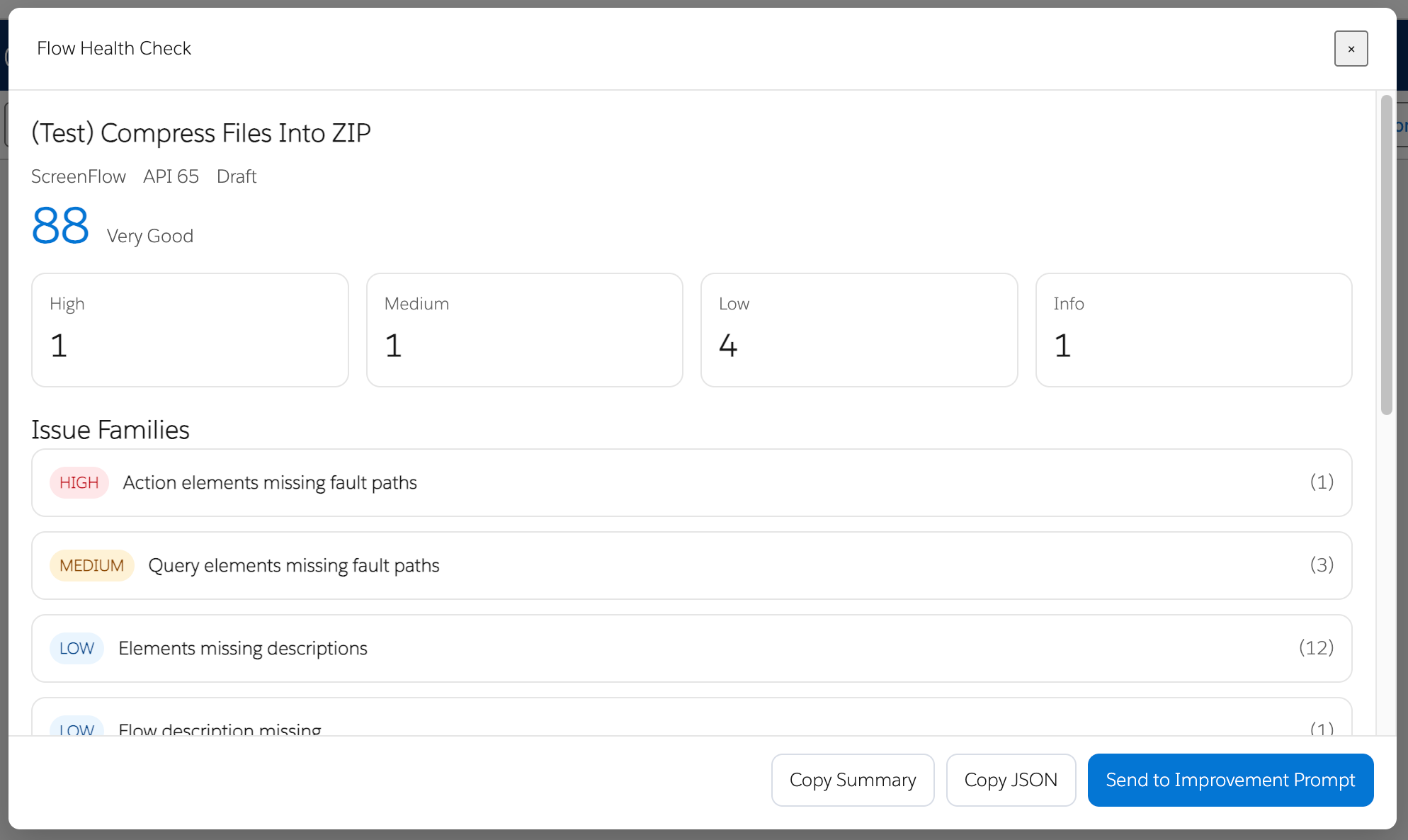
Header summary
The header displays:
- Flow label
- Flow type
- API version
- Flow status
- Overall score
- Rating
Severity summary cards
The report includes summary cards for:
- High
- Medium
- Low
- Info
Issue Families
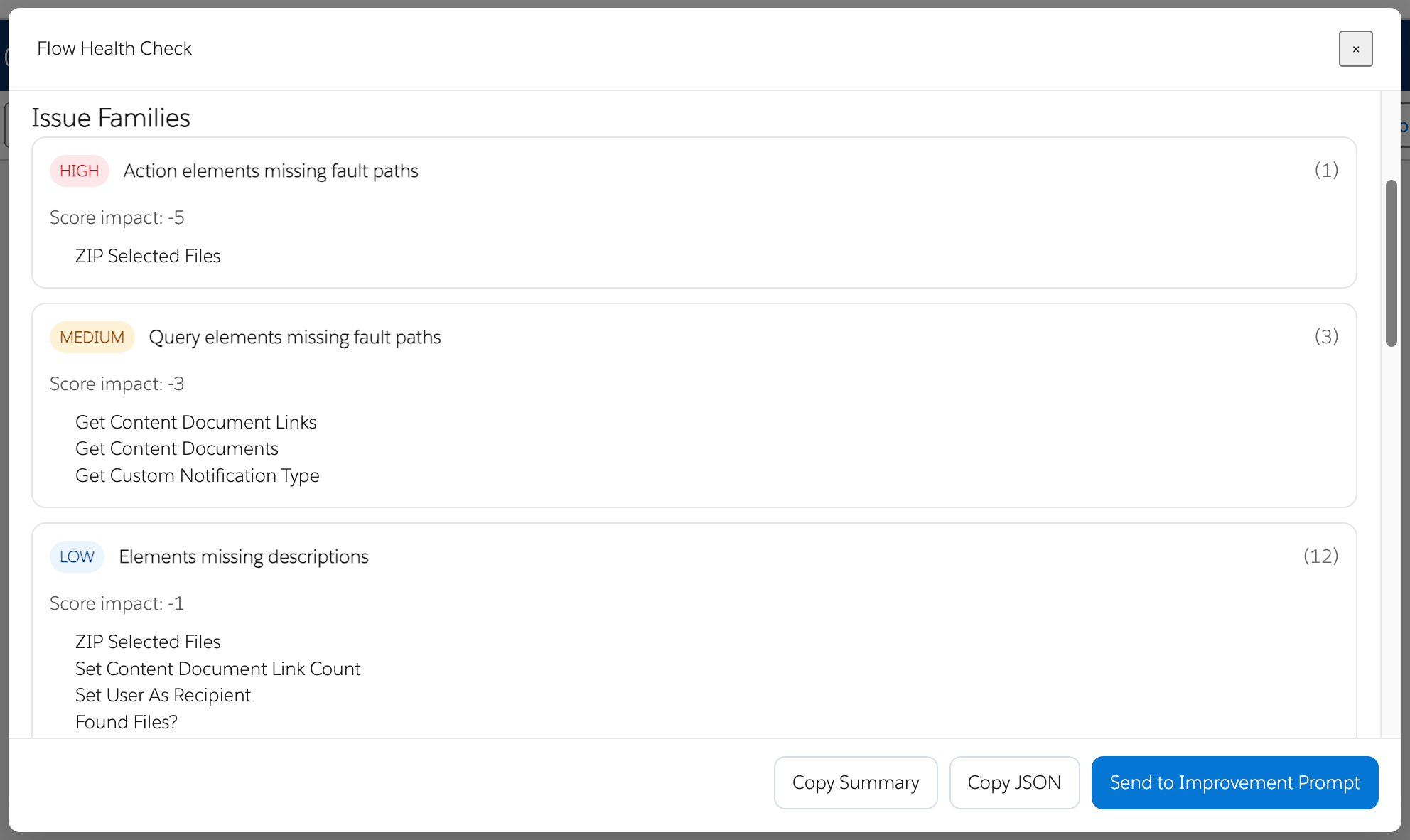
Each issue family can be expanded to show:
- severity
- title
- instance count
- score impact
- affected items
Flow Profile
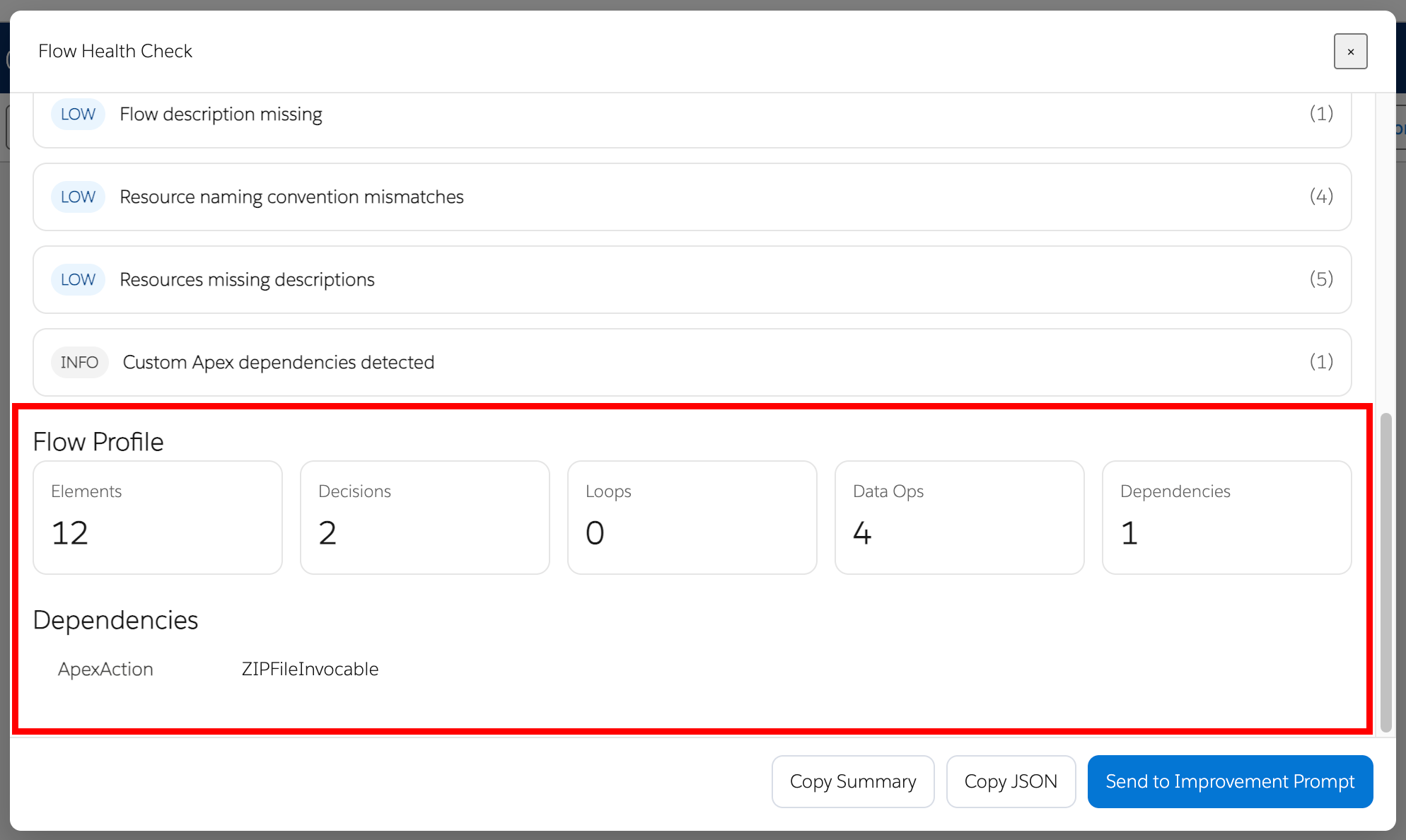
The Flow Profile section currently includes metrics such as:
- Elements
- Decisions
- Loops
- Data Operations
- Dependencies
Dependencies
The report lists detected custom dependencies, including where applicable:
- Apex Actions
- Subflows
- LWC components
- Apex-defined types
- External actions
Scoring model
The current scoring model starts from 100 and deducts score once per issue family based on the worst severity in that family.
Current score weights are:
- High = −5
- Medium = −3
- Low = −1
- Info = 0
Current score rating bands are:
- 90 or above = Excellent
- 80 to 89 = Very Good
- 70 to 79 = Good
- 55 to 69 = Poor
- below 55 = Very Poor
Checks currently included
Maintainability checks
- Missing Flow description
- Missing element descriptions
- Missing resource descriptions
- Generic element naming
- Naming convention mismatches for Flow, variables, formulas, and constants
Reliability checks
- Missing fault paths
- Broad or missing entry criteria for record-triggered Flows
Performance checks
- DML inside loops
- Get Records inside loops
- Nested loops
- High data operation count
- Trigger timing mismatch — after-save flows that appear to only update the triggering record (may be better suited as before-save)
Portability checks
- Outdated API version
- Possible hard-coded Salesforce IDs
- Possible hard-coded URLs
- Custom dependency inventory
How to use it
- Open a Flow in Salesforce Flow Builder.
- Launch Flow Health Check from the extension.
- Wait while the Flow metadata is analysed.
- Review the report in the modal.
- Expand issue families to inspect affected items.
- Use one of the available export actions if needed.
Export and follow-on actions
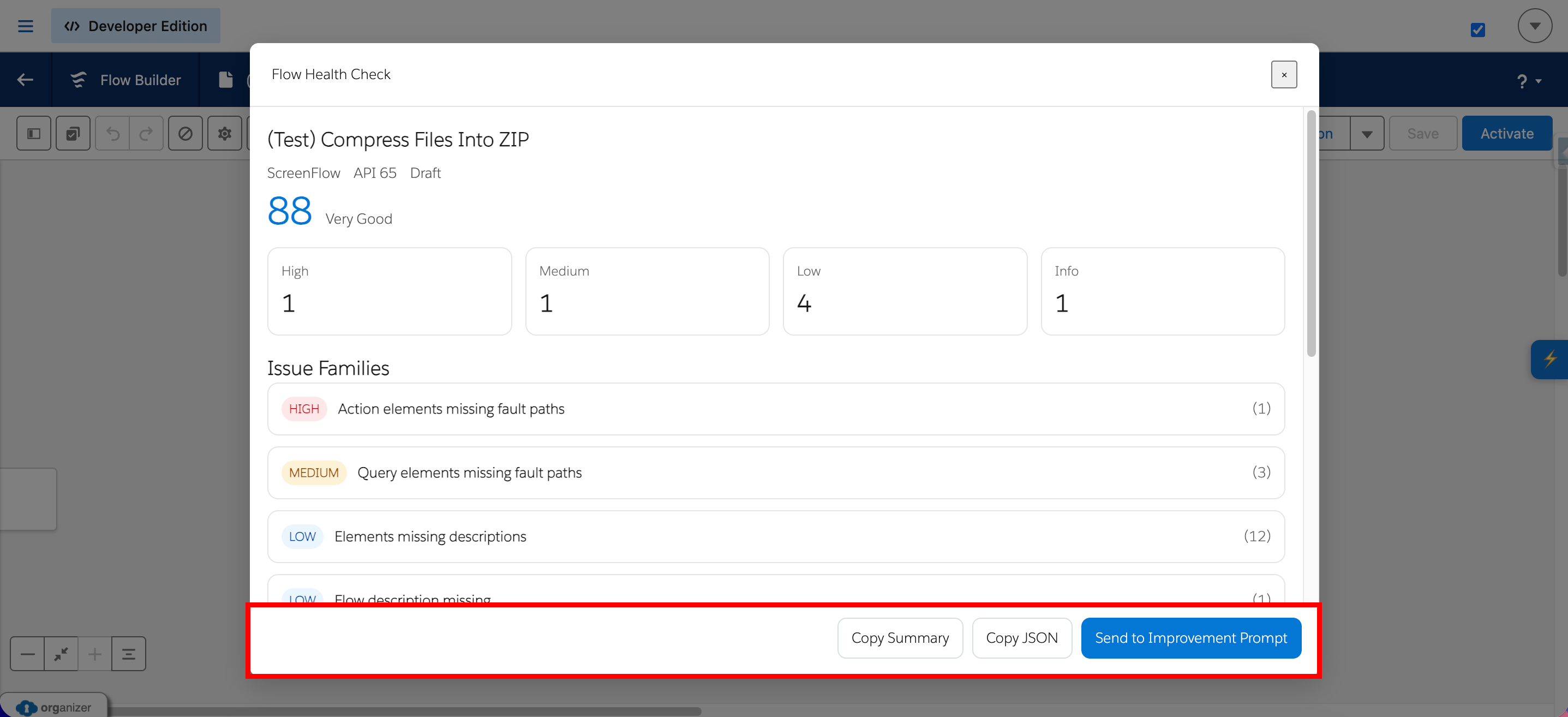
The current modal footer supports the following actions:
- Copy Summary — Copies a markdown summary of the Health Check report.
- Copy JSON — Copies the raw JSON report.
- Send to Improvement Prompt — Copies a generated improvement prompt to the clipboard and, if available, activates the AI Assistant.
Error handling
If the current Flow ID cannot be determined from the URL, or if Flow metadata cannot be retrieved, the feature displays an error state in the modal.
If an unexpected error occurs during execution, the modal displays the error message where available.
Notes and limitations
- The Health Check runs against the currently open Flow.
- The report is based on retrieved Flow metadata and the current rule set.
- Some findings are heuristic in nature, especially possible hard-coded ID and URL detection.
- Dependency reporting is intended as an inventory aid and does not by itself confirm deployment readiness.
- Naming convention checks depend on available settings and prefix configuration.
- If naming configuration cannot be fully built, the Health Check falls back to default behaviour.