Flow Trigger Explorer Enhancer

Overview

Flow Trigger Explorer Enhancer is a beta feature that adds lightweight enrichments to Salesforce Flow Trigger Explorer rows.

The feature is designed to make the explorer easier to scan by surfacing useful metadata directly in the list view, without requiring users to repeatedly open the right-hand details panel for basic context.

Current enrichments include:

Where it appears

Flow Trigger Explorer Enhancer is intended for Salesforce Flow Trigger Explorer.

It runs against the explorer row list and also learns additional metadata from the right-hand Flow Details panel when that panel is available.

What the feature does

Flow Trigger Explorer Enhancer currently provides the following functionality:

  1. Detects that the user is in Flow Trigger Explorer.
  2. Waits for the explorer to become available.
  3. Creates a reusable tooltip container.
  4. Reads the current trigger context from the page.
  5. Scans visible Flow rows in the explorer.
  6. Adds inline row enrichments where possible.
  7. Learns richer metadata from the Flow Details panel.
  8. Caches learned metadata locally.
  9. Re-renders enriched rows when better metadata becomes available.
  10. Watches for DOM changes and refreshes enhancements as the explorer updates.
Row enrichments

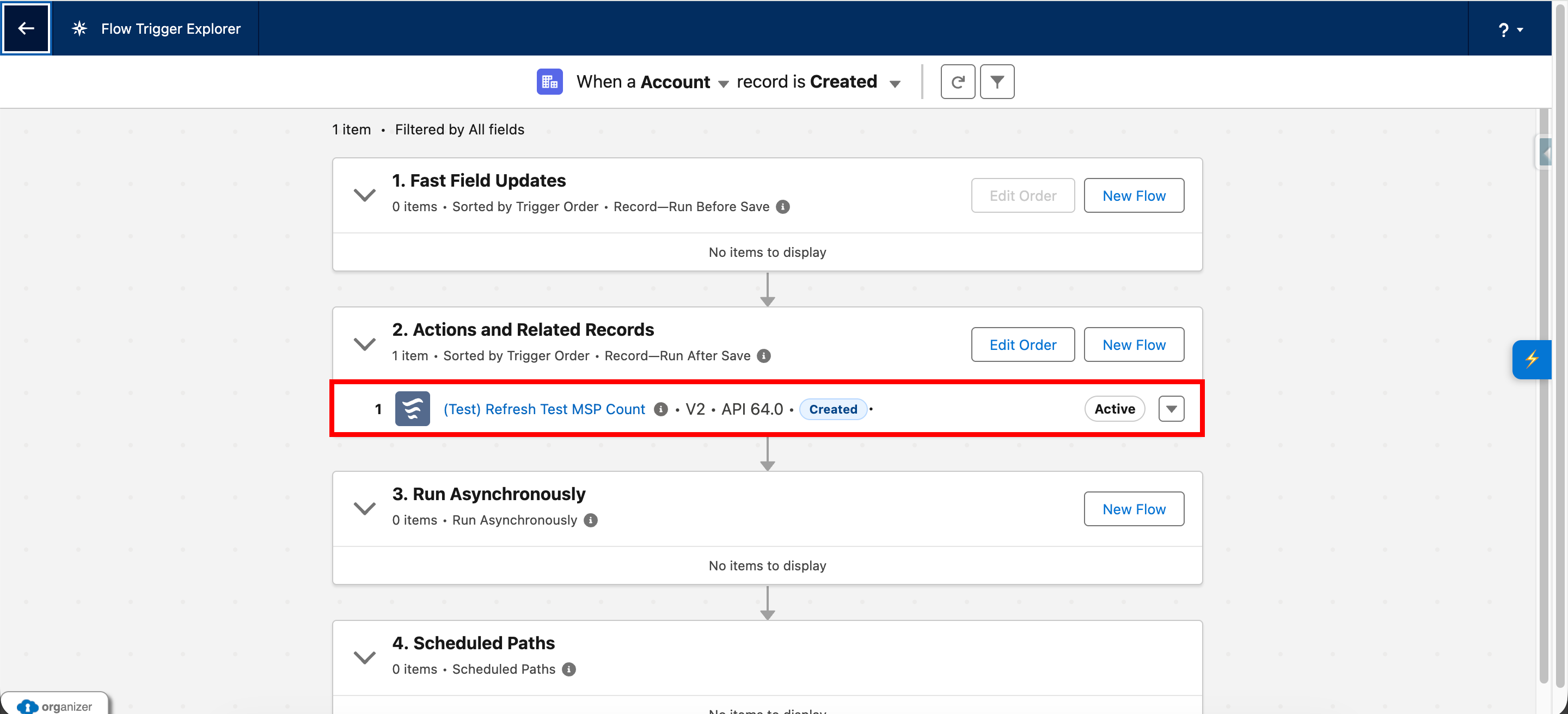
The feature currently enhances explorer rows in three main ways.

Info icon

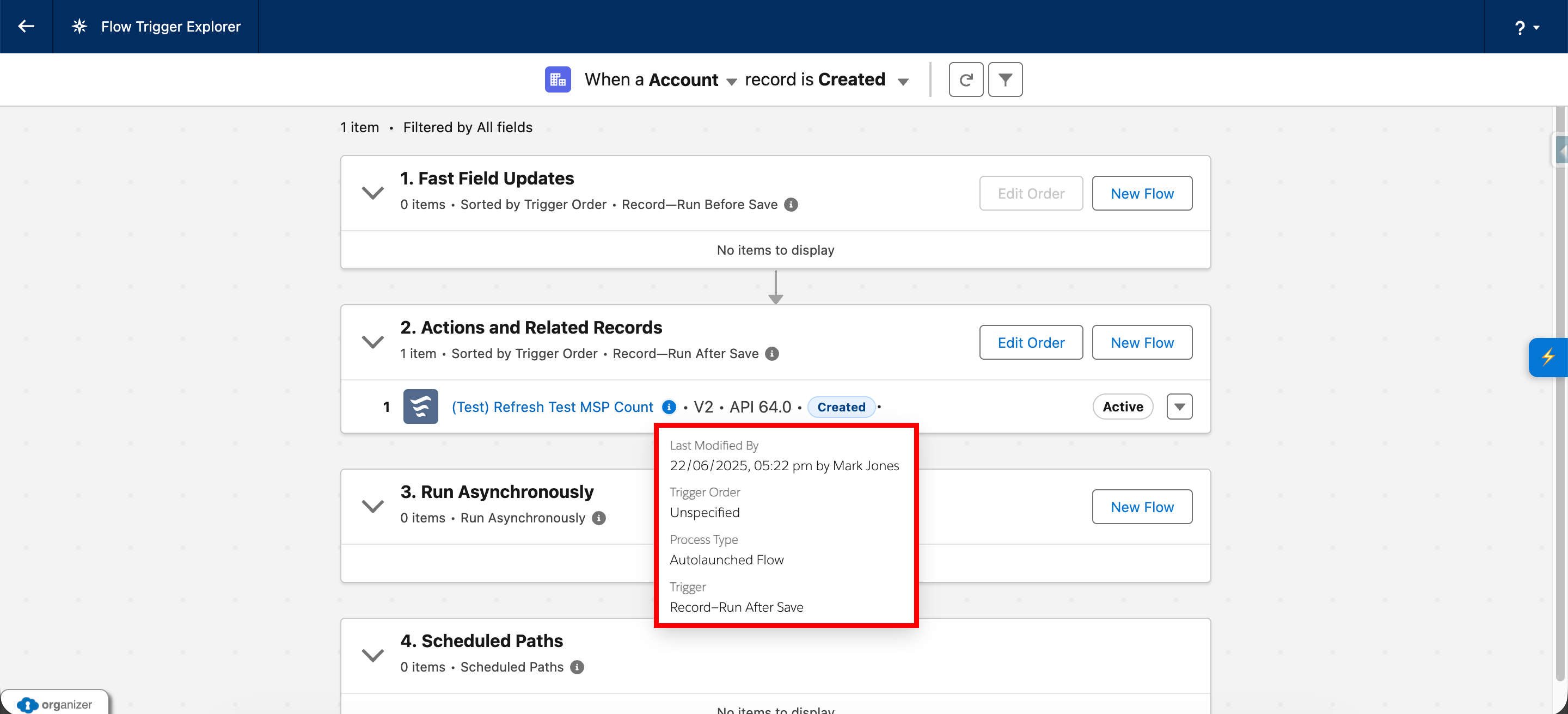
An inline info icon is added next to the Flow label.

This icon opens a compact tooltip showing selected metadata for the Flow when available.

Inline metadata

The feature can display inline metadata such as:

These values are shown inline when they are known and not already being displayed clearly in the row.

Context tags

The feature also adds coloured tags for the current trigger context, using labels such as:

These tags are intentionally limited to the current explorer context only and are not persisted across views.

Flow Trigger Explorer Enhancer Injected Information

Tooltip content

The tooltip is intentionally compact.

When metadata is available, it currently shows:

If metadata is not currently available in the explorer DOM, the tooltip shows a fallback message instead of blank fields.

This helps the feature remain useful without making assumptions beyond what is visible in the page.

Flow Trigger Explorer Enhancer Tooltip Information

How metadata is learned

The feature is described in the source as a DOM-first implementation and does not make API calls.

Instead, it works by combining two sources of information:

Row-level data

The explorer rows themselves provide:

Details panel data

When the right-hand details panel is present, the feature attempts to extract richer metadata such as:

This learned metadata is then merged into a local cache and used to improve future row rendering.

Caching behaviour

The feature stores learned metadata in local storage.

The cached data currently includes values such as:

This allows the enhancer to improve row display after it has seen richer metadata once, without requiring that every detail always be visible at the same moment.

Trigger-context behaviour

The feature detects the current trigger context from the page title area.

It currently looks for contexts corresponding to:

These are then shown as coloured context tags on the matching explorer rows.

The source comments explicitly note that the feature does not persist these contexts across views, in order to avoid false tagging.

How to use it

  1. Open Salesforce Flow Trigger Explorer.
  2. Allow the enhancer to initialise.
  3. Review the explorer rows for added metadata and context tags.
  4. Hover over or focus the info icon to view the compact tooltip.
  5. Open a Flow Details panel where needed to allow richer metadata to be learned and reflected back into the row list.
  6. Use the extension refresh action if needed to re-run enhancements.

Refresh behaviour

The enhancer can be refreshed manually.

The current implementation refreshes by:

It also watches the DOM and refreshes automatically when relevant explorer rows or details-panel content change.

Notes and limitations

Current implementation notes:

Accessibility and usability notes

The current implementation includes: