Flow Version Manager
Overview
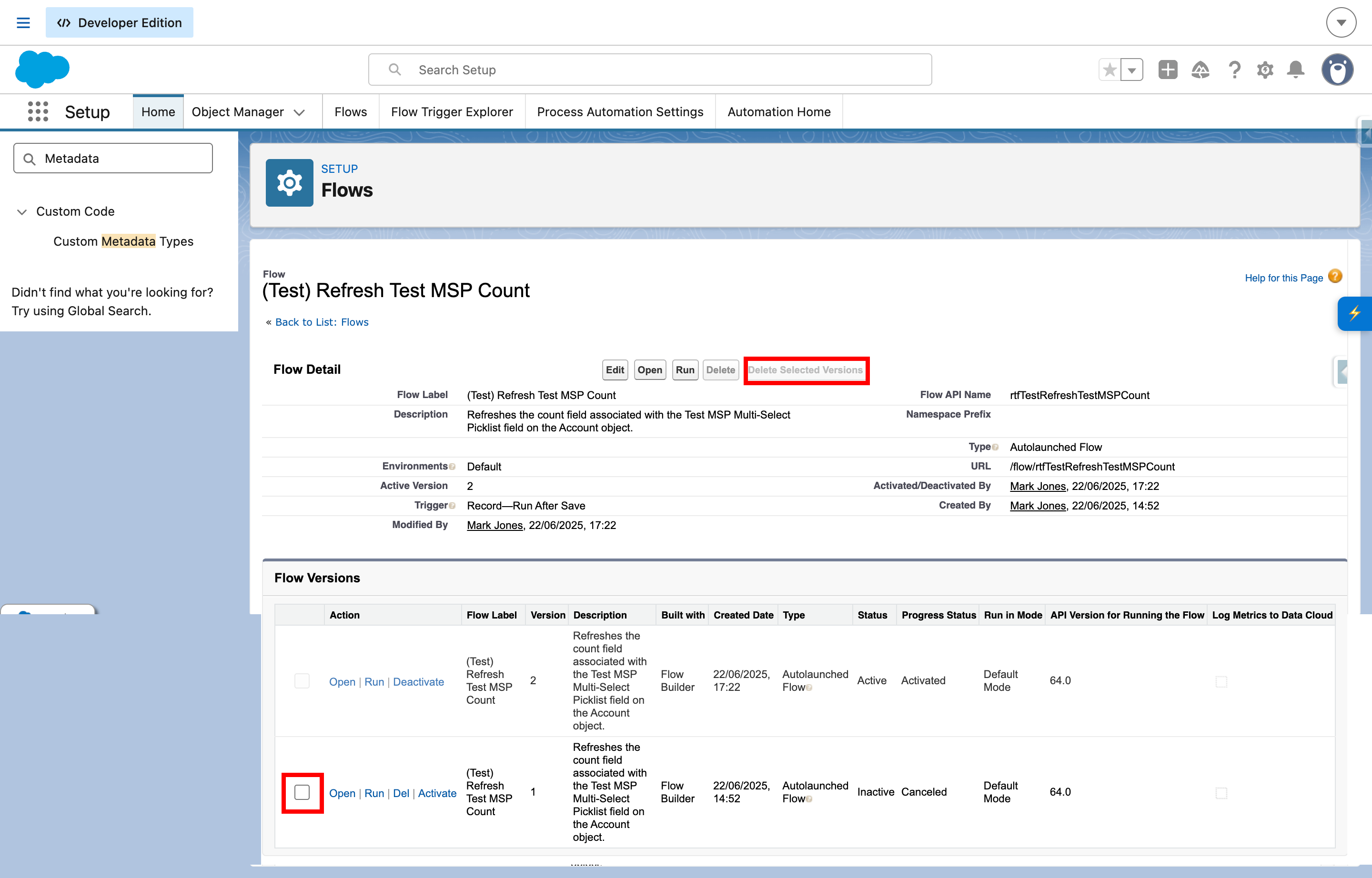
Flow Version Manager enhances the Salesforce Flow versions page by adding bulk-selection controls and a guided way to delete multiple Flow versions.
The feature is designed to make version clean-up easier and safer by allowing users to select multiple deletable versions, review them in a confirmation modal, and then process deletions using Salesforce’s native delete behaviour.
Current functionality focuses on bulk deletion support for Flow versions listed on the Setup versions page.

Where it appears
Flow Version Manager is intended for the Salesforce Flow details / versions page in Setup.
The implementation targets the versions table on the Flow details page and enhances it by:
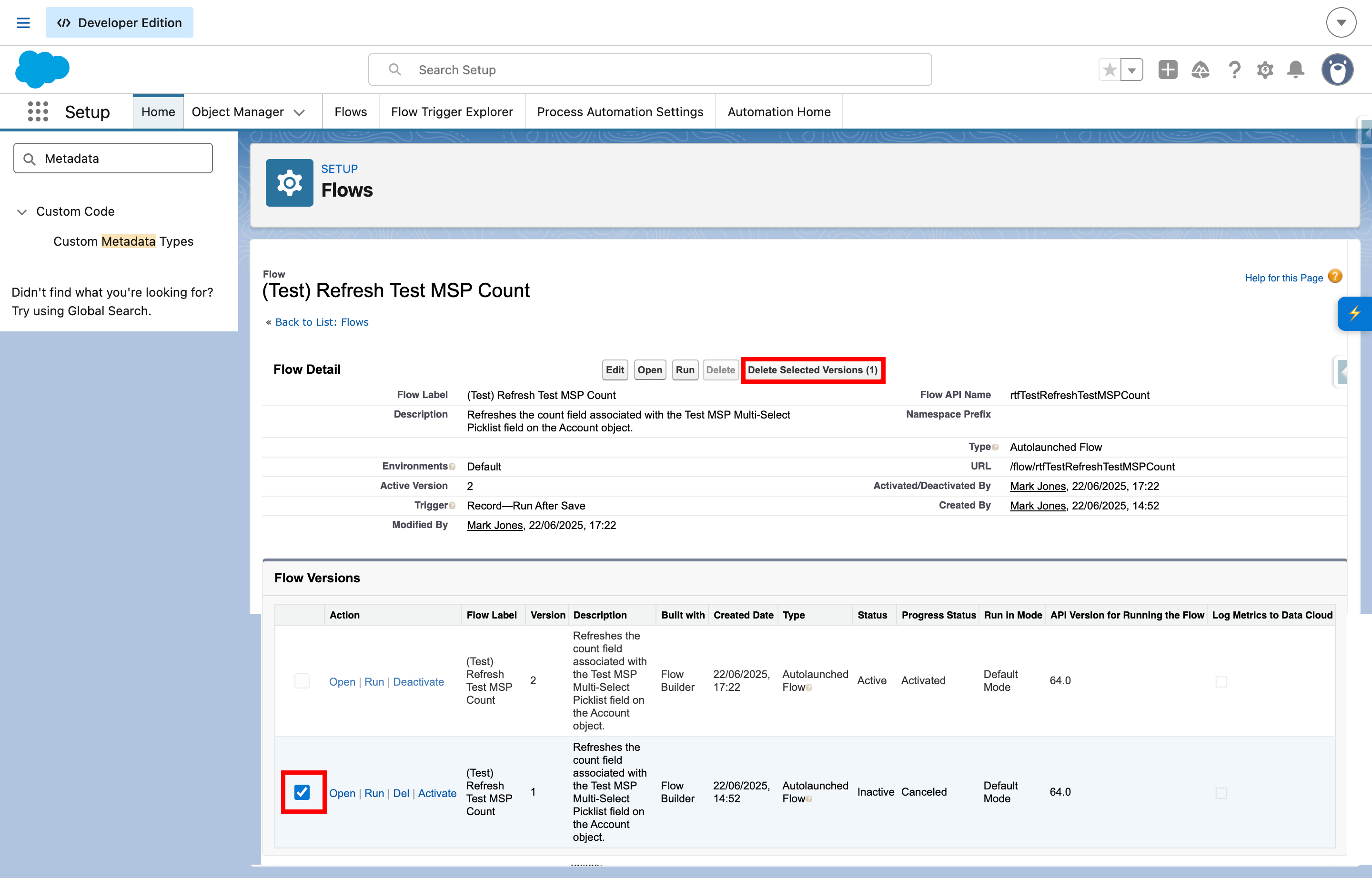
- adding a new selection column to the table
- adding a Delete Selected Versions action button to the page button bar
The source comments describe the target as:
- Visualforce-style Flow Details page
- versions table id:
view:lists:versions
What the feature does
Flow Version Manager currently provides the following functionality:
- Detects whether the current page is likely to be a Flow versions/details page.
- Finds the Salesforce versions table.
- Injects a checkbox column into the table header.
- Adds row-level checkboxes for supported versions.
- Tracks selected versions internally.
- Adds a Delete Selected Versions action button to the page button bar.
- Prevents unsupported versions, such as active versions, from being selected for deletion.
- Opens a confirmation modal before deletion begins.
- Requires the user to type DELETE before continuing.
- Queues and processes deletions using Salesforce’s native delete links.
- Shows a completion toast after deletion is finished.
Selection behaviour
Each eligible version row receives a checkbox.
The feature keeps track of selected version rows and updates the toolbar button label dynamically, for example:
Delete Selected VersionsDelete Selected Versions (1)Delete Selected Versions (3)
If no versions are selected, the bulk delete button remains disabled.
Active versions
The current implementation does not allow active versions to be deleted.
Rows identified as active are treated as non-deletable and their checkbox is disabled.
This is surfaced in the implementation through row state handling and the message:
Active versions cannot be deleted

Bulk delete action
Once one or more versions are selected, users can click Delete Selected Versions to start the bulk deletion flow.
The action is designed to keep the user in control by introducing a confirmation step before any delete actions are triggered.

Confirmation modal
Before deletion begins, Flow Version Manager opens a confirmation modal.
The modal currently includes:
- a title
- a short confirmation message
- a warning about in-progress interviews
- a list of the selected versions
- an input requiring the user to type DELETE
- Cancel and Delete action buttons
The warning text is intended to make users think carefully before removing versions and currently states that:
- if interviews are in progress on any selected version, those interviews may fail
- deleting Flow versions is recommended only during off-peak hours
- active versions cannot be deleted
Confirmation requirement
The user must type:
DELETE
before the destructive action button is enabled.
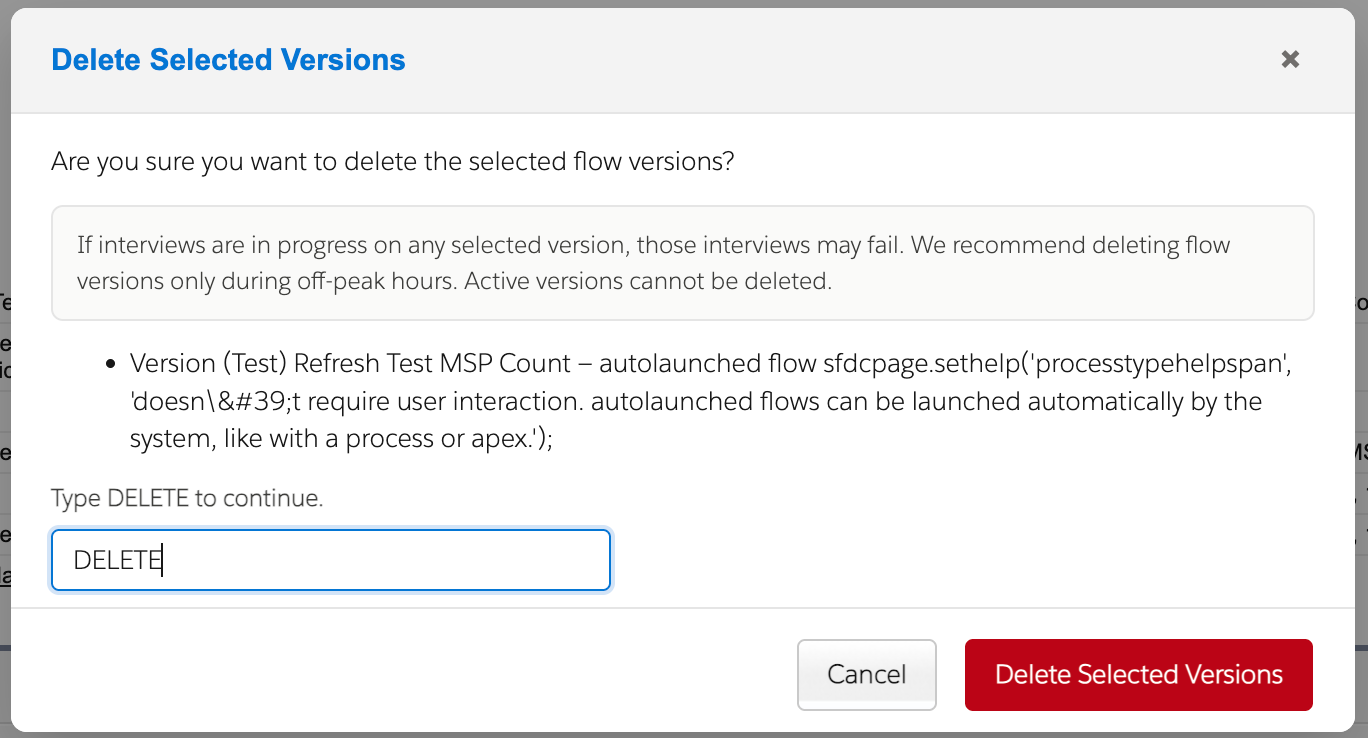
This is intended as a deliberate safeguard against accidental bulk deletion.
Suggested file:
/images/flow-version-manager/flow-version-manager-confirmation-modal.png
How deletion works
Once confirmed, the feature prepares a session-based deletion queue and then proceeds through the selected versions one by one.
The current implementation:
- stores the selected versions in session storage
- resumes queued deletion if needed
- invokes Salesforce’s native delete action for each version
- overrides the native confirmation prompts during the queue-driven process
- clears the queue when complete
- stores a deferred completion message
- shows a success toast after the process completes
This approach allows the feature to work with Salesforce’s existing delete behaviour rather than replacing it with a custom deletion mechanism.
User feedback
Flow Version Manager provides several forms of user feedback.
Button state
The bulk delete button is enabled or disabled depending on:
- whether any versions are selected
- whether a deletion process is already underway
Modal validation
The destructive confirm button remains disabled until the user types DELETE exactly.
Toast notifications
After queued deletion completes, the feature displays a toast such as:
Deleted X version(s).
If the deletion queue fails to start or resume, the feature attempts to show an error toast.
How to use it
- Open a Flow details page that includes the versions table.
- Review the available versions.
- Select one or more deletable versions using the added checkboxes.
- Click Delete Selected Versions.
- Review the list of selected versions in the modal.
- Type DELETE to confirm.
- Allow the queued deletion process to complete.
- Review the completion toast once the operation finishes.
Safeguards and risk notes
Current safeguards include:
- active versions are not selectable for deletion
- a confirmation modal is always shown
- the user must type DELETE to continue
- deletions are processed through Salesforce’s native delete action
- queue state is stored so deletion can resume if needed during page transitions
Even with these safeguards, deleting Flow versions is still a destructive action and should be treated carefully.
Notes and limitations
Current implementation notes:
- The feature is designed specifically for the Salesforce Flow details / versions page.
- It depends on the versions table and button bar being present with expected DOM patterns.
- The feature is focused on bulk deletion of versions rather than version comparison or activation management.
- Active versions cannot currently be deleted through this feature.
- The feature uses session storage to manage queued delete operations and completion messaging.
- Because it relies on Salesforce’s native delete action links, changes to the underlying page structure may require future updates.
Accessibility and usability notes
The current implementation includes:
- row-level checkbox controls
- a modal dialog with explicit confirmation wording
- keyboard handling within the modal for Enter and Escape
- clear destructive-action wording for deletion confirmation